

Troubleshoot common problems
This page is the triage desk: when something breaks, come here to place it in the right category, then continue to the specialized page with the detailed fix. Every task page carries its own "when something goes wrong" section for that workflow's failures; this page exists for the moments you do not yet know where to start.
Locate the problem by branch
Four branches, four reflexes:
- A missing screen or button: almost always permissions, modules, or the subscription plan, and rarely a software fault. Follow Users and security.
- Disagreeing numbers: check document states first, the ledger second. Follow Issue, transfer, and adjust and Review reports.
- Devices: work down the chain of reader, MQTT broker, configuration. Follow Manage RFID.
- Channels: check the connection and the sync screen. Follow Process channel orders.
Quick lookup by symptom
| Symptom | Check | Where to go |
|---|---|---|
| A menu entry is missing | Role, enabled modules, plan features | Users and security, Settings and integrations |
| Stock unchanged after receiving or issuing | Document still Submitted | Purchase and receive |
| A warehouse cannot be selected | The warehouse's Capabilities and the account's warehouse scope | Catalog and warehouses, Users and security |
| Stock in two warehouses off after a transfer | The transfer still on the road | Issue, transfer, and adjust |
| RFID reads missing tags | Blocked tags, orientation, materials, connection | Manage RFID |
| RFID reads stray tags | The read zone reaching the next shelf | Manage RFID |
| Duplicate EPC reported | The tag's history and attached product | Manage RFID, inspect with Tag Inspect before touching the link |
| Marketplace orders not arriving | Channel connection and the sync screen's Webhooks tab | Process channel orders |
| Two reports disagree | Timezone, warehouse, date range, transaction status | Review reports |
| Someone sees less data than a colleague | Assigned warehouse scope | Users and security |
| Cash gap at session close | Refunds and cancellations during the session | Sell, return, and use kiosk |
| A count reports many items missing at once | Pending transfers and submitted documents | Count and reconcile |
Collect evidence before fixing
Fixing data before gathering evidence is the fastest way to turn a small mistake into an untraceable mess. Before changing any number:
- Screenshot the error message together with the filters in use.
- Record the document or order numbers involved.
- Export or capture the relevant Stock Ledger lines.
- For RFID incidents, also record the EPC, the reader name, and the read location.
- For integration incidents, record the channel, the time, and the status of the latest sync run.
The who-did-what log lives under Administration → Activity Logs, and it usually answers "when did this number change, and by whom":
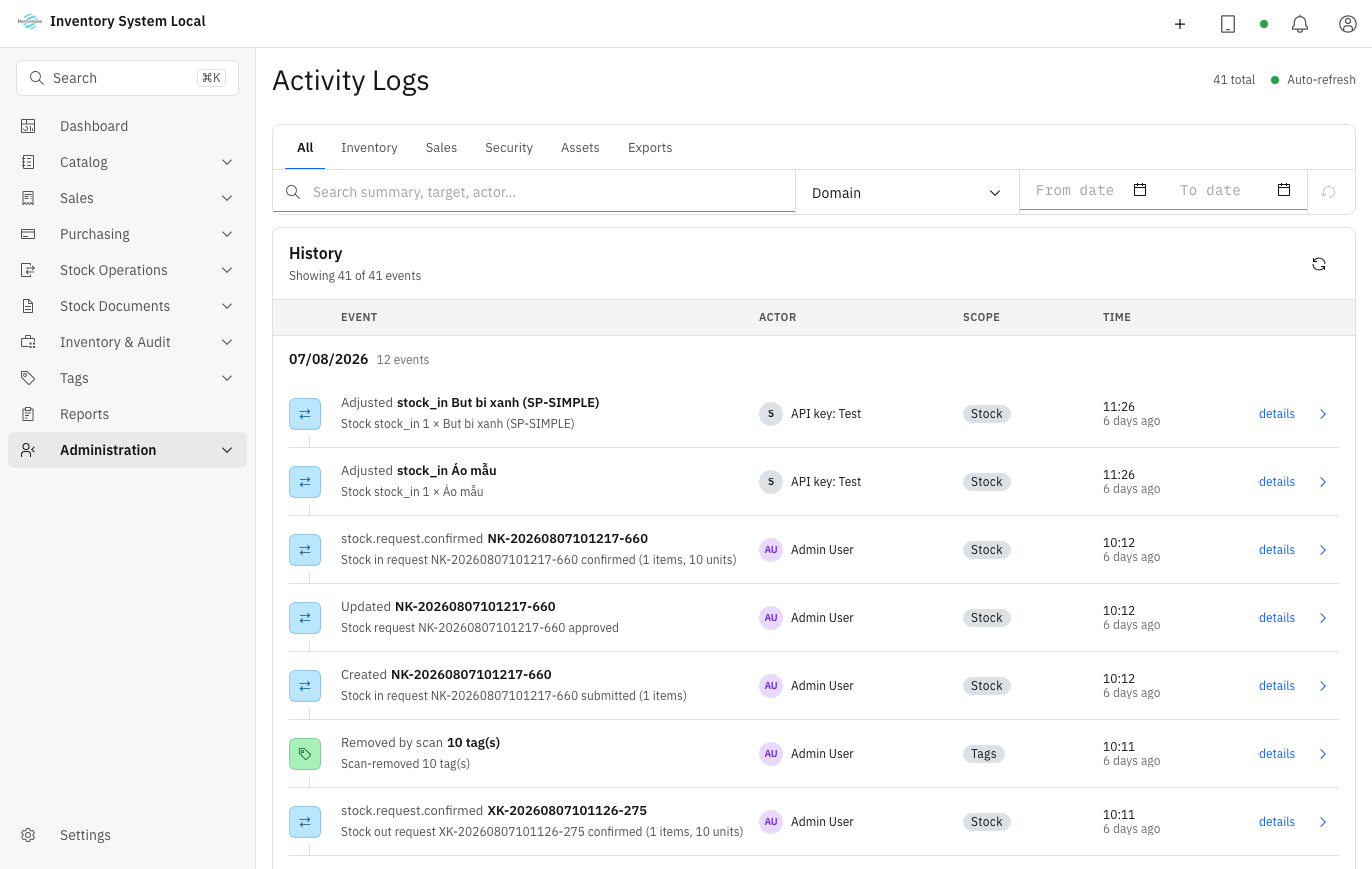
And the final rule: never edit stock directly to "make a difference disappear". When an adjustment is warranted, take the legitimate path with a clear reason and a reference to the evidence you collected, see Issue, transfer, and adjust.
Read next
- Count and reconcile inventory: when the suspicion spreads beyond a few items.
- Review reports: the tracing order when two numbers disagree.
- Settings and integrations: when the fault smells like a configuration change.